Facebook Feedback Score: What It Is, Why It’s Now Invisible, and How to Fix It (2026)
Your Facebook feedback score is Meta’s 0–5 rating of your business, built from post-purchase customer surveys. Meta stopped showing it as a simple number. But the survey data is still collected, and in our experience it remains one of the quiet factors behind rising CPMs, unstable delivery, and stalled scaling. If your ads are getting more expensive and nothing obvious explains it, this is one of the first places we look.
Most advertisers blame the creative. Some blame targeting.
Almost nobody looks underneath Ads Manager, at a signal layer they can no longer see on any dashboard.
What is a Facebook feedback score?
The Facebook feedback score is a rating Meta forms about your business based on how customers say they were treated after they bought from you. Meta sends post-purchase surveys to buyers, asking about product quality, shipping speed, customer service, and whether the product matched the ad. Those answers feed a score on a 0–5 scale.
The ranges that have been widely reported, and that match what we see, look like this:
- 4 and above. Healthy.
- 2 to 3. Weak, and worth your attention.
- Below 2. Associated with a delivery penalty. Ads tend to cost more and reach fewer people.
- Below 1. Associated with losing the ability to advertise at all until it recovers.
The score was never really about your campaigns. It reflects your business. The cumulative experience your customers report having with you.
How does the Facebook feedback score work?
Meta collects the signal continuously and feeds it straight into the auction. Here is the chain we watch turn a single customer survey into a higher CPM (and what the real numbers look like across accounts we manage):
Two things make this easy to miss. First, it is invisible. None of it surfaces in Ads Manager. Second, it tends to compound. When Meta detects negative feedback, it appears to survey your customers more often, so a small problem left alone for a few months can turn structural.
And the feedback score is only one input. Meta weighs it alongside your account trust and Business Manager standing when it decides how to treat you. That is the bigger picture of how Facebook evaluates business pages.
What actually feeds the signal is your real post-purchase reality. Across what Meta measures and what its surveys ask, five inputs come up again and again:
From our client cases: the most common pattern we see is a brand sitting on months of poor customer feedback (slow shipping, misleading product claims, undisclosed charges) that took no action because “the feedback score is gone.” Across the accounts we handle, the three complaint types that do the most damage are consistently the same. Product not as advertised, low product quality, and unexpected charges after payment. Those are also the three easiest to trigger with careless dropshipping, which is why the damage compounds fastest for exactly the businesses that can least afford it.
Not all complaints carry the same weight. In our experience, the categories sort roughly into severity tiers, and the most damaging ones are exactly the ones sloppy dropshipping produces:
How big is the gap? Independent analyses put a low score against a healthy one at a 50%+ CPM difference at the same bid, and across our own client accounts we have seen swings approach 100%. This isn’t fading, either. In October 2025 a Meta client-solutions manager publicly described customer feedback as a stronger lever in the ad auction. Meta still won’t publish the formula, but the direction is not in doubt.
Why can’t I see my feedback score anymore?
Because Meta changed how it’s shown. It used to be a single number you could look up. In our experience, around October 9, 2024, that visible number disappeared from our client accounts, and in its place Business Suite now shows a “Ratings & Reviews” panel. Don’t be fooled by that star rating. In our experience it is not your feedback score, and the review counts rarely even match your real sales volume. The true, survey-based score still runs underneath, out of sight. (That October date is our own observation across the accounts we manage, not a dated Meta announcement.)
What matters is what didn’t change. Meta did not stop asking. The post-purchase surveys still go out, and here is a real one:
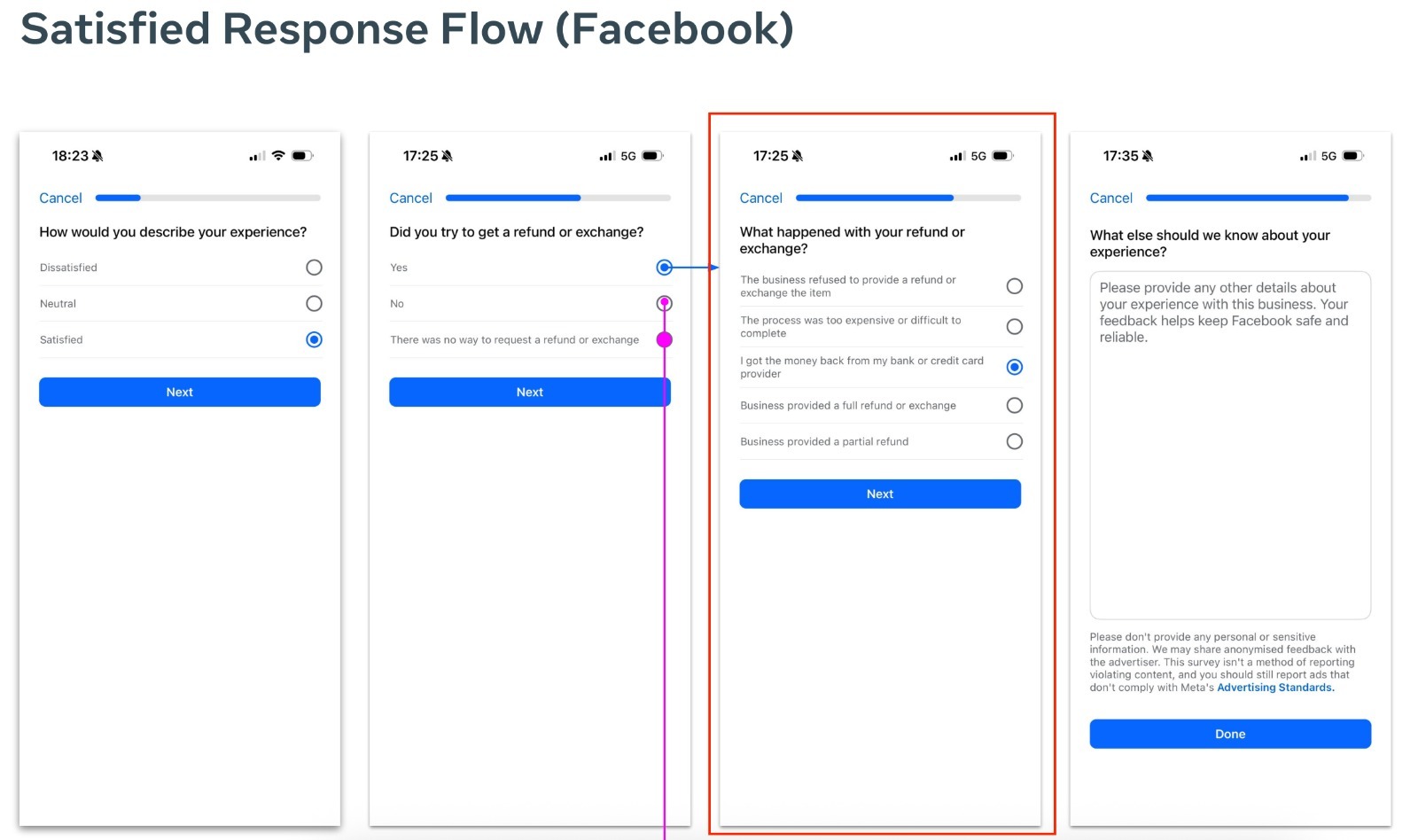
So the score got harder to see, not switched off. That’s exactly why it’s easy to assume it’s gone, and why, in our view, it’s worth auditing rather than ignoring.
What are the symptoms of a low Facebook feedback score?
Because the number is hidden, you tend to feel it as performance problems that don’t respond to the usual fixes:
- CPM rises with no external cause. New creatives produce the same elevated cost, because the drag sits at the account level, not the ad level.
- A scaling ceiling at a specific spend. The account runs fine at low budgets, then deteriorates past a threshold.
- Inconsistent or throttled delivery. Campaigns under-spend their budget and stall in the learning phase.
- Faster creative fatigue and unstable ROAS. The account simply has less room to work.
None of these prove a feedback problem on their own. Performance moves for many reasons. But when two or more show up together, especially after a rough patch, the feedback signal is worth ruling in or out alongside the related HIVA and account-trust signals. For the full diagnosis, see low Facebook feedback score: symptoms, causes & what it’s costing you.
How to tell if it’s your problem when the number is hidden
Since the number is hidden, you diagnose by triangulation. Two checks beyond the symptoms above:
- Correlate the timing. Did performance start slipping after a fulfilment problem, a bad supplier batch, or a refund spike? That lag is the fingerprint of a feedback issue.
- Look at your own customer data. Support tickets, delivery times versus promises, return rates. The story your customers are telling Meta is usually the story your inbox is already telling you.
More ad rejections are another pattern we see: higher scrutiny applied to a lower-trust account, which advertisers usually blame on a policy change.
How do you fix or improve a Facebook feedback score?
There is no button and no quick trick. Quick tricks are what get accounts penalized. The score is driven by real customer experience, so the fixes are structural:
- Close the gap between your ads and reality. Misleading claims and “too good to be true” offers generate the highest-severity complaints. Make your ad promises match what ships.
- Fix fulfillment and shipping speed. Late delivery is a recurring negative signal. Set accurate expectations and then meet them.
- Reduce refunds and complaint triggers. Undisclosed charges and quality issues are among the most punishing categories. Remove them at the source.
- Improve post-purchase communication. Proactive updates reduce the negative-survey rate.
- Repair the accumulated history. This is the hard part. Improving customer experience today improves the new data Meta collects, but it won’t instantly undo months of weak signals. Working through that backlog is where a structured feedback score audit tends to shorten the timeline.
The order matters. Fix the customer-experience inputs first, then work the accumulated history. Doing the second without the first just re-degrades the account. For the full walkthrough, see how to fix and improve your Facebook feedback score.
Structurally, a proper feedback-score intervention runs in three stages, the same shape we use on client accounts. Quick tricks rarely work. Structural fixes do, and most accounts see measurable stabilization within 2–4 weeks (the timeline depends on order volume and how long the problem has run):
Protect the score once it recovers
When a store’s performance suddenly tanks while everything looks right on the ad side, the ads are rarely the problem. In our experience, fixing the customer experience is what fixes the performance the large majority of the time, closer to 95% than 50%.
Recovery without protection just resets the same countdown. The brands that never hit the feedback cliff treat this as infrastructure, not a one-off cleanup. They watch their refund and complaint patterns, keep fulfillment tight as they scale, and build account structure that can absorb the occasional bad week. At $30,000 to $50,000 a day, a single logistics disruption can make CPMs explode from one day to the next.
Is fixing your feedback score safe?
Done properly, yes. Because “properly” means genuinely improving customer experience and account structure, which is exactly what Meta’s system rewards. What is not safe is buying reviews or faking feedback. Those are the fastest routes to a permanent penalty.
How we source this. The patterns here come from Unlimited Scaling’s day-to-day work across 1,000+ e-commerce accounts on Meta. Where we cite tendencies, they’re aggregated and anonymized from real client cases, not Meta’s official figures. Meta doesn’t publish a penalty formula, so we describe what we consistently observe, not guarantees.
How to check your Facebook page feedback score
Since late 2024 you can no longer see a single numeric page score in your dashboard. Meta replaced the visible number with graph-style views. To check your Facebook page feedback score today, open Account Quality (Business settings, then your page or ad account, then Account Quality) and look at the customer-feedback section. You’ll see the trend and any flagged issues rather than a raw 0–5 figure.
People call this the same thing by many names. Page score, Facebook page score, customer feedback score, page feedback score. But it’s one signal: Meta’s post-purchase read on your customer experience. Even without the visible number it’s still active and still shaping your CPM and delivery, which is why you diagnose it from the trend and the symptoms above rather than a single value.
It didn’t disappear in 2024. Only the number did
Around October 2024, Meta removed the visible feedback score from advertisers’ dashboards (in our experience, roughly the 9th). Most people took that to mean the score stopped mattering. It didn’t. The display went away; the back-end collection never did. Every day you run ads, Meta is still surveying your customers and still feeding that signal into what you pay. You just can’t see the number anymore.
What replaced it is a “ratings and reviews” panel in Business Suite, and here’s the trap. It’s glitched, and it is not your feedback score. The tell is simple. The number of reviews it shows has no relationship to your actual sales. We routinely see large stores with zero reviews and tiny stores with a handful. Five stars there does not mean you’re healthy. Treat it as a decoy, not a diagnosis. Your dashboard isn’t lying, it’s just not showing you the number that matters.
So how do you see your real score now? You can’t self-serve it. The only reliable way we know is to ask your Meta representative for your “customer experience insight.” Most advertisers can request it. And counter-intuitively, telling Meta you intend to improve is rewarded, not penalised.
Why the public rating and the hidden signal disagree
In our experience the public figure and the hidden signal frequently disagree. Stores running genuinely poor operations sometimes show a flattering 4.9 while the internal signal behind their account is weak. Stores doing everything right sometimes see a 2 surface, or no data at all. The section can also lag by weeks or months, show partial data, or not populate for a given Business Manager. Don’t diagnose off the visible rating alone.
How Meta actually collects it: the daily survey
The score is built from post-purchase surveys. When someone buys through your ad, Meta can send them a pop-up (and in-feed surveys) asking how the experience went. In our experience this runs continuously, effectively every day you advertise.
Timing matters more than people realise. The survey typically fires within about three weeks of purchase. That’s why slow shipping is lethal. If the product hasn’t arrived by the time the survey goes out, the customer answers “I never received it,” which is the single most damaging response you can get.
The survey itself is a branching tree. The customer first picks an overall sentiment: negative, neutral or positive. If it’s positive with everything “exceeded,” there are few follow-ups. If it’s negative, Meta drills in, and one of the sharpest branches is refunds and exchanges. Did the customer try to get a refund? Did you refuse it? Was it too hard or too expensive? Did they have to charge back through their bank? Was the refund full or partial? Then there’s a free-text box, and in our experience Meta parses those exact words to categorise you, so the literal terms customers write genuinely matter.
Three dimensions do most of the scoring: how fast you delivered, whether the product matched the ad, and the experience on your website. Get those three right and most of the score takes care of itself.
It’s not just the survey: the full signal stack
The post-purchase survey is the core, but Meta reads customer satisfaction from a whole stack of signals. In our experience that includes the comments on your ads (how many, their quality, how you reply, the health of the comment section), public and private shares, the in-feed relevance survey (“how relevant is this ad? want to see more like it?”), page signals (whether it’s verified, whether it or related pages were banned before), post-purchase notifications to the buyer, and even on-site behaviour like whether visitors stay or bounce. The score you can’t see is assembled from far more than one pop-up, which is why “great creative” alone can’t rescue a weak customer experience.
The four zones, and the hidden percentile that really decides your cost
On the old 0–5 scale, we think in four zones (this reflects what we’ve observed across accounts, not a Meta-published table):
But the deeper mechanic is a percentile model, and it’s counter-intuitive: lower is better. In the customer-experience report, each complaint category shows a percentage that ranks you against other advertisers in your niche. If “low-quality product” shows 91%, Meta considers you worse than 91% of advertisers in that category, and you lose auctions and pay more. In our experience, below 70% is already healthy. If you have four or more categories above 80%, you’re in roughly the bottom 20% of your vertical, which quietly wrecks your delivery even while the visible dashboard looks fine.
And the categories are not equal. Ranked by how much they hurt, from the reports we’ve seen:
- Product fake / not as advertised. A killer. It can get you banned outright.
- Low-quality product or service. Critical impact.
- Unexpected charges (subscriptions). A silent killer. Always warn customers before you re-bill and make cancelling easy.
- Poor customer support. Slow, absent, or impossible to resolve.
- Late delivery. Surprisingly, the least damaging. You can still scale with late complaints if the rest is clean.
- Misleading marketing. Bites later, often after two or three months, then caps your spend hard.
When Meta starts watching closely: the “3 and 30” rule
Meta is tolerant early and gets strict as you scale. In our experience the score only really appears once you’re doing roughly 10–15 orders a day, and aggressive tracking kicks in around three weeks and 30 orders a day, very roughly a thousand orders in, after which negative signals start to bite. It also resets. If you tested a product, spiked, then dropped in volume, the clock effectively restarts. This is why CPMs so often explode right after you push past a few thousand dollars a day. Meta lets you run early, then “has a look” before it lets you scale further. (When that happens and your creative is fine, this is usually the real culprit behind a sudden CPM spike.)
Why page reviews started mattering more (the Andromeda shift)
Based on what we have tracked since Meta’s “Andromeda” auction update rolled out in late 2025, customer satisfaction got quietly upgraded from a soft signal into a much stronger input in the ad auction. This is our read from the field, not a Meta-published ranking factor. Three things appear to have changed at once:
- Public and hidden signals are paired. Boosting only your public star rating while you ignore the private survey data tends to do very little.
- Meta’s AI reads your actual store. From the reports we have seen, the system inspects your landing pages, your delivery and return policies, and your claims directly. It can penalise unclear policies, fake “low stock” warnings, or unrealistic offers before a single complaint arrives.
- Fast scaling triggers a reputation check. We have repeatedly seen accounts that jumped from a low daily spend to $5k to $10k a day within a couple of months get their customer-experience signals scrutinised before Meta let delivery keep expanding. This is a pattern we observe, not an official threshold.
Nothing gets banned. The account just slides down the priority order and the same budget buys less. We have seen clients drop from $100k days back to around $20k days when this signal turned against them. It pairs directly with the 2026 ban wave: a strong customer-experience signal is one of the things that keeps you on the safe side of it.
The trust tree: feedback score, HiVA, BM trust
Your feedback score doesn’t act alone. It’s the foundation of a stack. Above it sits your HiVA (High Value Advertiser) score, the internal bronze-to-platinum tier, and around it your Business Manager’s trust (who owns it, how clean it is).
The brands doing $100k days have the whole tree sorted. A gold or platinum account, a trusted BM, and a strong page score with its categories in the green. Fixing your feedback score is step one, but understand that it feeds the tiers above it. A weak feedback score drags your HiVA tier down, which is what actually caps your spending limits and inflates your CPMs.
What a strong score actually buys you
Beyond cheaper CPMs, a strong score buys three things most advertisers underestimate:
- Better audiences. The score is a ROAS predictor, not just a permission gate. Meta hands high-score pages the users most likely to buy, so a weak score silently caps your ceiling even if you’re a brilliant media buyer.
- Benefit of the doubt. A page with strong feedback and high trust survives a bad shipping week, a DMCA, or a verification wave. A weak-score page gets one bad week and it’s over. You build the positive signals before the problem comes, not after.
- Creative runway. With enough trust, Meta gives borderline creatives and angles more room, a quiet “we know this advertiser delivers,” so your winners last longer before they’re throttled or rejected.
What the data looks like: two managed accounts
Meta publishes no formula that says “feedback score X equals CPM Y”, so read this as a correlation with a strong mechanism underneath it, not a law of physics. The figures below are first-party, anonymized, and shared as directional evidence.
First, the metric we watch. Standard CPM is noisy, because the same person seeing your ad ten times inflates it. So internally we lean on CPMr, cost per 1,000 unique accounts reached, as a cleaner proxy for how much Meta trusts your ecosystem. It is our own working metric, not an official Meta figure.
- Account 1, a DTC supplements brand (spring 2026). The main ad account was banned, payments failed on the backup, and the Business Manager was downgraded a tier. CPMr spiked from about $99 to a peak of roughly $172, CTR fell from 3.8% to 1.65%, and weekly purchases dropped from 222 to about 97. After a “penalty cleanup” and Meta’s usual 2 to 3 week re-scoring lag, CPMr fell roughly 35% week over week ($181 to $116) about 17 days later, and weekly purchases reached 443.
- Account 2, a wellness brand (late spring 2026). As the feedback-score work ramped and post-purchase orders piled up, CPM on the main testing campaign slid from $30.25 to $18.99, about 37% down.
Trust, not saturation. During the crisis week on Account 1 we cut spend by 62%, from about $16.8k to $6.3k, and CPMr nearly doubled anyway. If high spend were driving the cost, slashing it should have brought it down. That is the fingerprint of a trust and quality penalty. If your CPM jumped and cutting spend didn’t help, look here before blaming creative.
Caveats. CPMs also move with seasonality, creative fatigue and targeting. On Account 2 a pixel double-firing issue made ROAS unreliable, which is why we lean on a delivery-side signal. The direction is consistent across accounts; the magnitude varies. Full breakdown: what fixing your score does to your CPMs.
How to actually raise it (without gaming it)
The real fix is becoming a better operator, aimed at the specific one or two categories dragging you down rather than everything at once. In practice: ship inside that three-week window (and never set your delivery time to eight weeks or more in Meta’s settings, which is a red flag that gets pages banned faster, not a clever way to buy time), make the product genuinely match the ad, put a real customer-support process in place so complaints don’t turn into reports and chargebacks, warn subscription customers before you re-bill, and manage your comment section without hiding so much that it looks suspicious. A useful free proxy while you’re flying blind: your Trust Pilot score tends to mirror your hidden Meta score. If you’re under 3 there, you’re almost certainly under-performing on Meta’s survey too. For the full step-by-step, see how to fix and improve your feedback score, and for the real numbers behind all this, what fixing your score does to your CPMs.
Public reviews feed the same signal: see how Facebook page reviews affect your ads.
Build an early-warning system before Meta reacts
Since the real number is hidden and the public one is unreliable, build a proxy so you spot trouble weeks before it hits delivery:
- Call customers roughly 30 minutes after purchase. Not an AI bot. A real person, briefly, asking why they bought and how they feel. It surfaces the exact friction Meta’s survey will later measure, while you can still fix it.
- Audit customer experience every quarter. Ecom always has bad batches (a supplier month, Chinese New Year, stockouts). Compensate for them with a reship, a fast refund and over-communication so they don’t bleed into the survey.
- Watch for the scaling cliff. A store runs smoothly at 15 orders a day, scales hard to 100 or 200, and collapses because fulfilment, packaging and support couldn’t keep up. The fix isn’t in Ads Manager. Tighten operations first, then rescale to a stable level.
Reviews and recommendations: what to do about the public side
- Turn recommendations on. When active, Facebook asks users whether they recommend your business and shows a 0-100% figure. Leaving it off removes a chance to show trust.
- Find the specific complaint category (delivery time, product match, support speed) and fix that root cause first.
- Ask happy customers at the right moment. A short call or email after a good delivery, inviting a page recommendation or an off-platform review. We have watched brands climb from around 1.5 to around 4.8 external rating largely off a disciplined post-purchase calling process.
- Respond to reviews calmly. A helpful reply reassures the next reader more than the complaint ever worried them. Report genuinely fake or policy-violating reviews, but don’t expect honest negative ones to be removed.
Worried a competitor will tank your page with fake reviews? In our experience it is very hard to pull off, and most of the time effectively impossible: a single account cannot mass-review a page and Facebook actively blocks that pattern. A sudden drop is far more likely coming from the private feedback surveys, so look at your own customer experience first.
FAQ
Is the Facebook feedback score still active in 2026?
As far as we can tell from the accounts we manage, yes. Meta changed how it’s displayed. The simple 0–5 number gave way to graph-style views around October 9, 2024 in our experience, but the post-purchase surveys still go out and the signal still appears to affect delivery and cost. Treat ‘the feedback score is dead’ as a misconception: the number got harder to see, not switched off.
Can a low feedback score increase my CPM?
In our experience it can. A weak score appears to lower your account’s trust and HIVA signals, which makes you less competitive in the auction, and that tends to show up as a higher CPM floor and reduced delivery at the same bid. Meta doesn’t publish a guaranteed penalty, so we treat it as a strong, auditable factor rather than a certainty.
What is a Facebook page penalty or red flag?
These are informal terms advertisers use for the restrictions and delivery limits that tend to follow degraded internal signals. They’re usually a consequence of accumulated negative feedback and compliance issues rather than a separate, standalone event.
How long does it take to improve a Facebook feedback score?
Improving the underlying customer experience starts changing the data right away, but visible stabilization usually takes a few weeks, depending on your order volume and how long the issue has run. Anyone promising an instant fix is overpromising.
Does the feedback score affect my whole ad account or just one page?
It feeds trust signals across your business: page, ad account, and Business Manager. Because these signals interact, a feedback problem rarely stays contained to one asset.
Written by Mouss, founder of Unlimited Scaling, an agency that has helped 1,000+ e-commerce brands recover and protect their Meta ad assets. Based in Bali, he has spent 8+ years inside the mechanics of Meta’s ad ecosystem, from feedback scores and HIVA tiers to bans and appeals, and shares field data from real client cases. Follow him on Instagram @mouss_unlimitedscaling.