What Meta Actually Sees on Your Ad Account: The Hidden Back-End Scorecard (2026)
Meta keeps a scorecard on your ad account. You will never see it in Ads Manager. The people with partner-level access can. It isn’t one number. It’s a stack of internal signals: a “HiVA” tier, a risk profile, a banhammer status, and a live list of diagnostics. Together they quietly decide your CPMs, what you can spend, and when a ban is coming. Here’s what’s actually on it.
Every advertiser feels this scorecard without ever seeing it.
Two accounts run the identical funnel. One gets cheap delivery and shrugs off ban waves. The other burns money and gets disabled.
That gap isn’t luck. It’s what Meta’s back-end has quietly recorded about each asset. Across the accounts we manage, we look at that back-end every day, and the same fields keep surfacing. This is a plain-English tour of them, and what actually moves them.
The scorecard, at a glance
Open an asset in the partner back-end and you don’t get a single “account score.” You get a panel of separate signals, each measuring something different. These four are the ones that matter most.
1. HiVA tier: your delivery-quality grade
HiVA (“High Value Advertiser”) is a tier stamped on your assets. It tracks how good an advertiser Meta thinks you are. In the back-end it runs Bronze → Silver → Gold → Platinum, and it’s separate from a simple “Is HiVA? yes/no” flag. The higher the tier, the cheaper and steadier your delivery. It’s the quiet reason two identical accounts get very different CPMs. We go deep on it in the HiVA tiers guide. Here’s what it looks like at the top of the ladder.
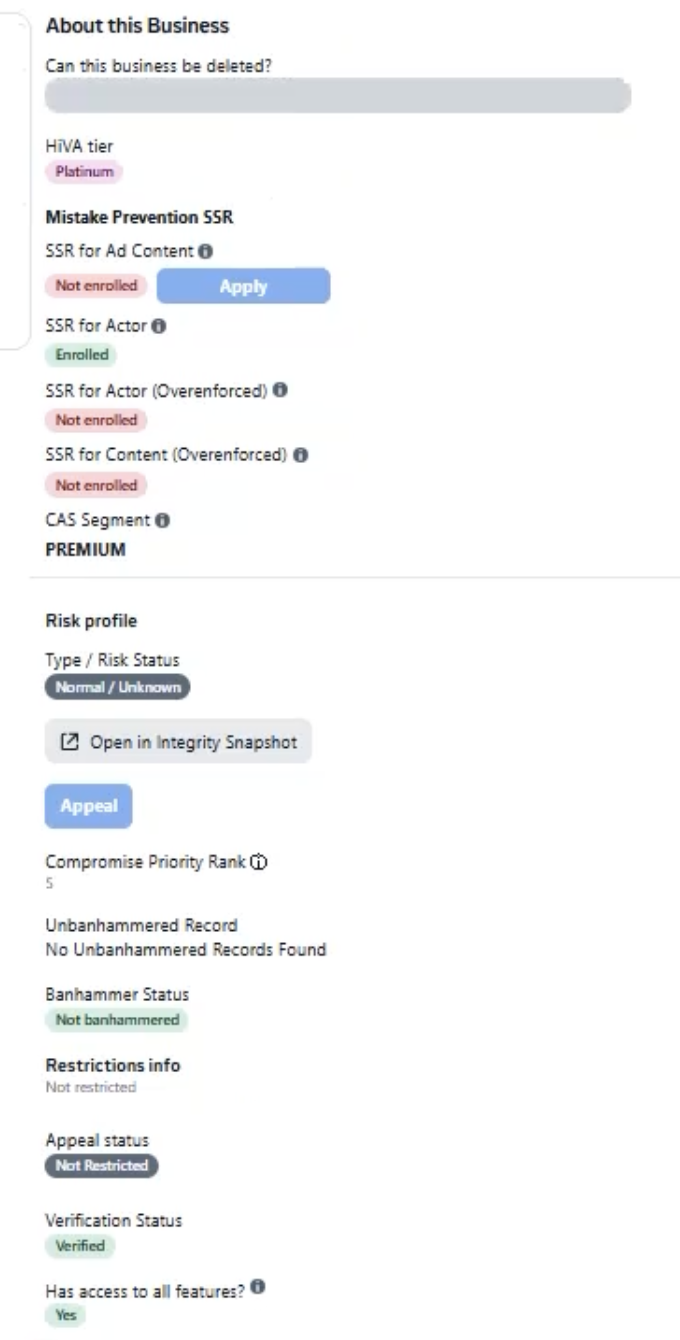
2. Risk profile and banhammer status: your enforcement standing
This is the section that predicts a ban before it lands. The back-end shows a risk profile (say, “Normal / Cleared” versus flagged), a banhammer status (“not banhammered” versus banhammered), an unbanhammered record, and a compromise priority rank. A healthy asset reads clean across all of them. When these start turning, the disable is usually already on its way. That’s why a clean enforcement standing is worth protecting, not just reacting to. And when it does go wrong, that’s the recovery playbook.
3. Diagnostics: the live issues most advertisers never see
Under “Diagnostics,” the back-end lists concrete, ranked problems on the asset. The kind of thing that silently throttles you. We see the same ones on repeat: “ad account restricted, preauth spend,” “charge verified credentials only,” “invalidations affecting ad account,” auction overlap, audiences too small, and a “business security scorecard” flag. Here’s what a lower-tier account carrying restrictions looks like.
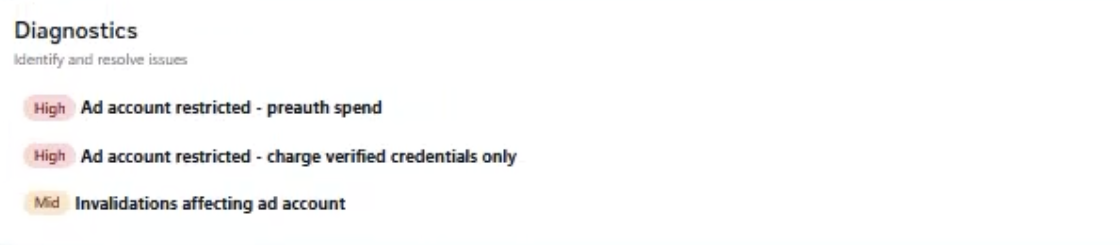
“Invalidations” is the one worth understanding. It’s the system flagging that your strategy looks off. Too many changes. A structure it doesn’t trust. So it quietly de-prioritises your delivery. You feel it as a CPM creep with no obvious cause.
4. The feedback signal: what feeds the whole card
None of the above is random. Underneath sits your customer-experience signal, the post-purchase surveys Meta still sends your buyers about shipping, product quality, communication and refunds. Those answers feed the (now-invisible) feedback score, which in turn shapes your tier, your account trust and your ban risk. It’s a flywheel, not a set of independent dials.
The tier is the ladder everything climbs
The HiVA tier is the single field that best sums up your standing. As you move up it, delivery gets cheaper and your assets get more resilient to the ban waves that sweep low-tier accounts.
What you can see, and what stays hidden
From the front end you get a sliver of this. Business Support Home → Account Quality shows restrictions, a business-level feedback rating and appeal options. Everything else stays internal. The HiVA tier, the risk and banhammer fields, the raw diagnostics: none of it is ever surfaced to advertisers. That gap is exactly why the same disable can look “random” from your side and completely predictable from the back-end. If you want the fuller picture of how Meta weighs all this, see how Facebook evaluates business pages.
How to actually move the card up
You can’t edit these fields. But everything that feeds them is in your control.
- Fix the customer-experience signal first. Faster shipping, accurate product pages, responsive support and clean refunds are what lift the feedback score that feeds the whole card.
- Stop creating “invalidations.” Don’t restructure constantly or make dozens of changes at once. Erratic behaviour is exactly what the diagnostics flag.
- Keep your enforcement standing clean. Comply on creative and landing pages so the risk profile stays cleared. A single “banhammer” event is far more expensive to undo than to avoid.
- Run serious spend on a high-trust structure. An agency ad account starts higher on this ladder, which is why it delivers cheaper and survives waves that sweep low-tier assets.
See your account the way Meta does
Most advertisers optimise the things they can see and stay blind to the scorecard that’s actually pricing their ads. Getting a read on your real standing, the tier, the risk flags, the diagnostics, is exactly what our team does across 1,000+ brands. It’s usually the fastest way to explain a CPM problem or a ban risk you can’t otherwise see.
FAQ
What is a HiVA tier?
HiVA (“High Value Advertiser”) is an internal delivery-quality tier Meta keeps on your assets. It runs Bronze, Silver, Gold, Platinum, and it’s separate from a simple “Is HiVA? yes/no” flag. It isn’t shown to advertisers or officially published; it’s visible with partner-level back-end access, and the higher your tier, the cheaper and steadier your delivery.
Can I see my Meta account’s risk profile or banhammer status?
No. From Business Support Home → Account Quality you can see restrictions, a business feedback rating and appeal options, but the risk profile, banhammer status, HiVA tier and raw diagnostics are internal and never surfaced to advertisers. That’s why a disable can look random from your side while being predictable from the back-end.
What are “invalidations” on an ad account?
Invalidations are a diagnostic flag meaning the system thinks your strategy or behaviour looks off. Too many changes at once, a structure it doesn’t trust, and it quietly de-prioritises your delivery. You usually feel it as CPMs creeping up with no obvious cause. Stabilising your account is how you clear them.
How do I improve what Meta sees on my account?
You can’t edit the fields, but you control what feeds them: lift your customer-experience/feedback signal (shipping, product quality, support, refunds), stop creating invalidations by restructuring constantly, keep your creative and pages policy-compliant so your risk profile stays cleared, and run serious spend on a high-trust structure like an agency ad account that starts higher on the ladder.
Is this an official Meta scoring system?
The field names here, HiVA, banhammer, invalidations, are Meta-internal terms visible through partner-level back-end tooling, not an officially published or advertiser-facing scoring product. We describe them from what we see across the accounts we manage. The mechanics are real; the exact weightings are Meta’s and not disclosed.
Written by Mouss, founder of Unlimited Scaling, an agency that has helped 1,000+ e-commerce brands recover and protect their Meta ad assets. Based in Bali, he has spent 8+ years inside the mechanics of Meta’s ad ecosystem: feedback scores, HiVA tiers, agency accounts, bans and appeals, working from real partner-level account data. Follow him on Instagram @mouss_unlimitedscaling.